Hugo
简介
下载地址
hugo github
官网
官方文档
Go 语言编写的静态网站生成器,构建速度快。它拥有丰富的主题和强大的功能。
- extend 是模板继承的核心,通过 “父模板定义结构 + 子模板填充内容” 实现复用,适合统一布局的页面。
- 非 extend 模板是独立的,通过 partial 或 template 手动组合,适合灵活的片段复用或独立页面。
这里下载带有 extend 的安装包 如:hugo_extended_0.151.2_windows-amd64.zip
下载下来只有一个安装包二进制文件,README.md hugo 简介,LICENSE 协议
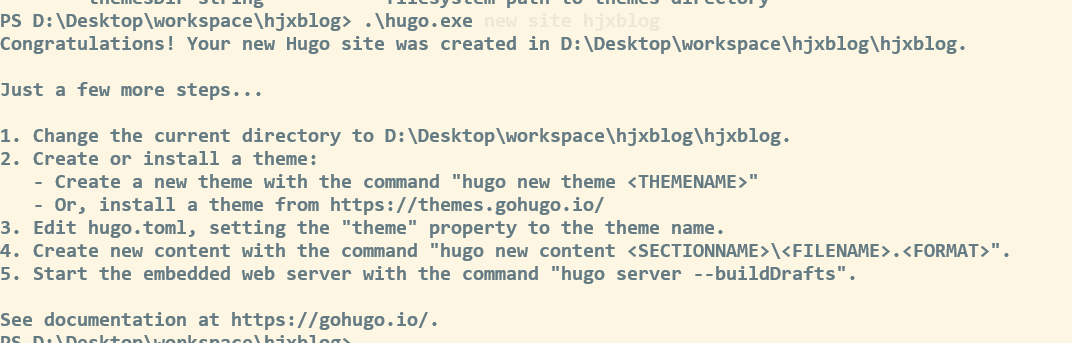
创建博客文件,用于存放博客内容
1
| .\hugo.exe new site hjxblog
|
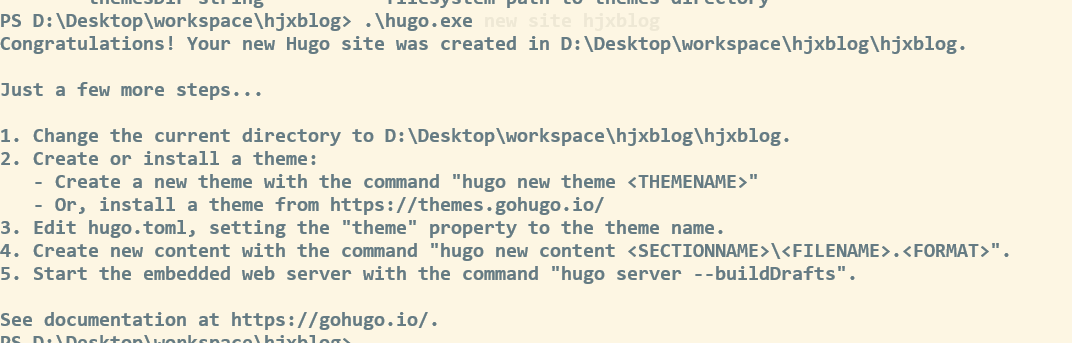
Hugo 目录结构
官方目录说明
默认生成的目录
 1
 2
 3
 4
 5
 6
 7
 8
 9
10
11
12
| .
├── archetypes
│ └── default.md
├── assets
├── content
├── data
├── i18n
├── layouts
├── static
├── resources
├── themes
└── config.toml
|
| 文件名称 | 简要说明 |
|---|
| archetypes | 该文件夹主要用来存储博客生成的模板文件,初次使用只有一个default.md,可以根据个人的主题配置添加自定义头部信息 |
| assets | 该文件夹主要用于保存博客样式css和js文件,通过资源观点传递的全局资源 |
| content | 保存个人博客所有内容 |
| data | 保存生成站点时候所需要的配置文件,用于增强内容、配置、本地化和导航的数据文件 |
| i18n | 多语言站点的翻译表 |
| layouts | 以为.html形式存储模板,将你博客内容呈现为静态页面,包含将内容、数据和资源转换为完整网站的模板 |
| static | 存储所有静态内容:图片、.css、.js等,当使用 Hugo 生成静态页面时,构建站点时所有内容将会被复制到 public 目录文件 |
| themes | 保存主题,可以包含一个或多个,每个主题位于自己的子目录中 |
| hugo.toml | 个人博客主题样式配置文件 |
启动 服务
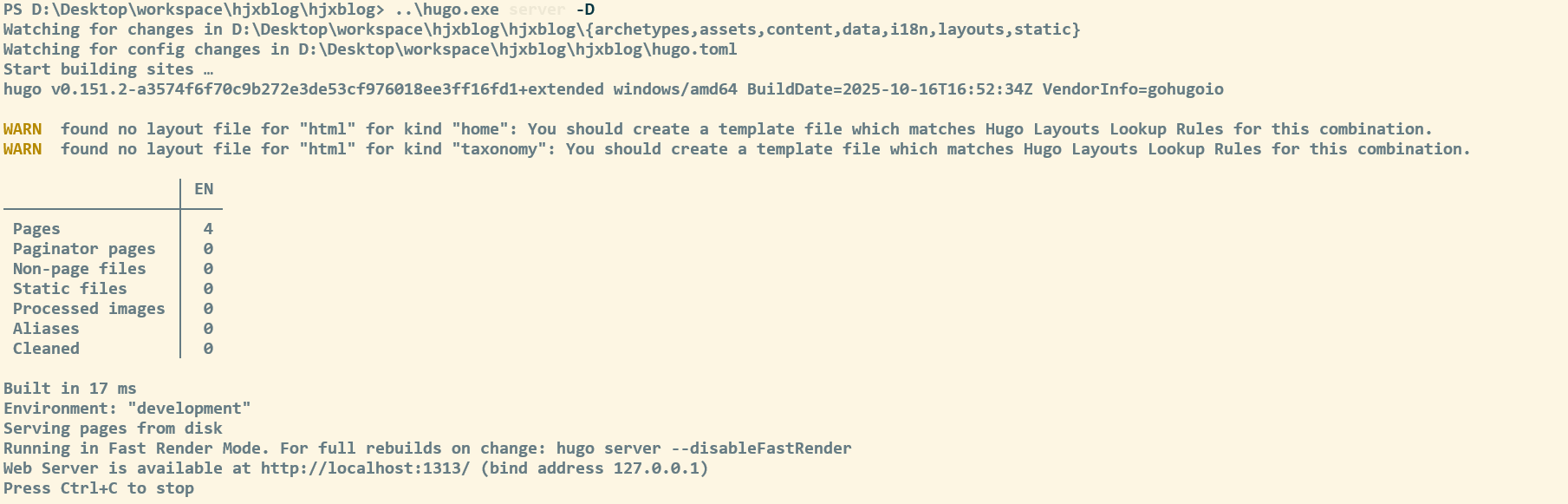
配置主题
Hugo 默认不带主题,因此你需要去 主题社区 下载主题,本文下载 Stack 和PaperMod 测试主题
Stack 文档
可以直接下载 release 版本 zip 包,加压到 theme 下,或者使用 submodule 方式直接 clone
1
| git submodule add https://github.com/CaiJimmy/hugo-theme-stack/ themes/hugo-theme-stack
|
负责 stack 中的exampleSite样例数据中的 Content 和 hugo.yaml 复制到主文件夹中
要修改主题,你必须将想要修改的文件复制到layouts目录下的相同路径中。
例如,若要修改themes/hugo-theme-stack/layouts/partials/header.html文件,你需要将其复制到layouts/partials/header.html,并在那里进行修改(从主题的代码库中复制代码)。这一规则同样适用于assets和static目录。
修改根目录下的文件,可以替换多种主题,通过 git submoudle 方式可以修改主题中的内容,用于自己想要的开发。
然后修改 hugo.yaml 中的内容
icons 官方地址
一篇博客文章的目录:
1
2
3
4
5
6
| content
└── post
└── my-first-post
├── index.md
├── image1.png
└── image2.png
|
content 内容构造格式: https://gohugo.io/content-management/sections/
短代码嵌入视频链接或代码片段 https://stack.jimmycai.com/writing/shortcodes
自定义菜单: https://stack.jimmycai.com/config/menu
修改字体
下载 100font
把字体文件放入assets/font下
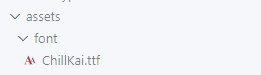
将以下代码修改并复制到layouts/partials/footer/custom.html`文件中(文件不存在就自己创建)
- **字体名**:给字体命名一个别名,随便填写就好,保持统一就行
- **字体文件名**:字体文件的全名,带后缀名的,也就是 **xxx.ttf**
 1
 2
 3
 4
 5
 6
 7
 8
 9
10
11
| <style>
@font-face {
font-family: 'ChillKai';
src: url({{ (resources.Get "font/ChillKai.ttf").Permalink }}) format('truetype');
}
:root {
--base-font-family: 'ChillKai';
--code-font-family: 'ChillKai';
}
</style>
|
eye
https://letere-gzj.github.io/hugo-stack/p/hugo/view-count/
友链、归档多列显示
修改assets/scss/custom.scss`文件(不存在则自行创建),引入以下css样式代码
 1
 2
 3
 4
 5
 6
 7
 8
 9
10
11
12
13
14
15
16
17
18
19
| @media (min-width: 1024px) {
.article-list--compact {
display: grid;
// 目前是两列,如需三列,则后面再加一个1fr,以此类推
grid-template-columns: 1fr 1fr;
background: none;
box-shadow: none;
gap: 1rem;
article {
background: var(--card-background);
border: none;
box-shadow: var(--shadow-l2);
margin-bottom: 8px;
margin-right: 8px;
border-radius: 16px;
}
}
}
|
文章目录折叠&展开
将以下代码复制到layouts/partials/footer/custom.html文件中
 1
 2
 3
 4
 5
 6
 7
 8
 9
10
11
12
13
14
15
16
17
18
19
20
21
22
23
24
25
26
27
28
29
30
31
32
33
34
35
36
37
38
39
40
41
42
43
44
45
46
| <style>
#TableOfContents > ul, ol {
ul, ol {
display: none;
}
.open {
display: block;
}
}
</style>
<script>
function initTocHide() {
// 判断是否存在文章目录
let toc = document.querySelector(".widget--toc");
if (!toc) {
return;
}
// 监听滚动
window.addEventListener('scroll', function() {
//清除class值
let openUl = document.querySelectorAll(".open");
if (openUl.length > 0) {
openUl.forEach((ul) => {
ul.classList.remove("open")
})
}
// 获取active-class
let currentLi = document.querySelector(".active-class");
if (!currentLi) {
return
}
// 展示子ul
if (currentLi.children.length > 1) {
currentLi.children[1].classList.add("open")
}
// 展示父ul
let ul = currentLi.parentElement;
do {
ul.classList.add("open");
ul = ul.parentElement.parentElement
} while (ul !== undefined && (ul.localName === 'ul' || ul.localName === 'ol'))
});
}
initTocHide()
</script>
|
返回顶页按钮
https://icon-icons.com/zh/
准备一张返回顶部图片,放到assets/icons`文件夹下
将以下代码复制到layouts/partials/footer/custom.html`文件中
 1
 2
 3
 4
 5
 6
 7
 8
 9
10
11
12
13
14
15
16
17
18
19
20
21
22
23
24
25
26
27
28
29
30
31
32
33
34
35
36
37
38
39
40
41
42
43
44
45
46
47
| <style>
#backTopBtn {
display: none;
position: fixed;
bottom: 30px;
z-index: 99;
cursor: pointer;
width: 30px;
height: 30px;
background-image: url({{ (resources.Get "icons/backTop.svg").Permalink }});
}
</style>
<script>
/**
* 滚动回顶部初始化
*/
function initScrollTop() {
let rightSideBar = document.querySelector(".right-sidebar");
if (!rightSideBar) {
return;
}
// 添加返回顶部按钮到右侧边栏
let btn = document.createElement("div");
btn.id = "backTopBtn";
btn.onclick = backToTop
rightSideBar.appendChild(btn)
// 滚动监听
window.onscroll = function() {
// 当网页向下滑动 20px 出现"返回顶部" 按钮
if (document.body.scrollTop > 20 || document.documentElement.scrollTop > 20) {
btn.style.display = "block";
} else {
btn.style.display = "none";
}
};
}
/**
* 返回顶部
*/
function backToTop(){
window.scrollTo({ top: 0, behavior: "smooth" })
}
initScrollTop();
</script>
|
自定义MD引用块颜色模板
创建文件layouts/_default/_markup/render-blockquote-alert.html`,并将以下代码复制进去
1
2
3
| <blockquote class="alert alert-{{ .AlertType }}">
{{ .Text | safeHTML -}}
</blockquote>
|
将以下代码复制进assets/scss/custom.scss`文件中
 1
 2
 3
 4
 5
 6
 7
 8
 9
10
11
12
13
14
15
16
17
18
19
20
21
22
23
24
25
26
27
28
29
30
31
32
33
34
35
36
37
| [data-scheme="light"] {
.alert-note {
--card-separator-color: #65bbee;
--blockquote-background-color: #e7f2fa;
}
.alert-tip {
--card-separator-color: #55aa55;
--blockquote-background-color: #eeffee;
}
.alert-warn {
--card-separator-color: #ffbb78;
--blockquote-background-color: #ffeecc;
}
.alert-error {
--card-separator-color: #cc3334;
--blockquote-background-color: #ffeeef;
}
}
[data-scheme="dark"] {
.alert-note {
--card-separator-color: #006699;
--blockquote-background-color: #002234;
}
.alert-tip {
--card-separator-color: #336733;
--blockquote-background-color: #112310;
}
.alert-warn {
--card-separator-color: #aa5501;
--blockquote-background-color: #452300;
}
.alert-error {
--card-separator-color: #880000;
--blockquote-background-color: #450000;
}
}
|
使用方法
- 可选项:NOTE | TIP | WARN | ERROR
- 可仿照上面css写法,自行添加新的css样式,来实现更多的可选项
1
2
| > [!NOTE]
> 这是markdown的引用块语法
|
代码块过长折叠&展开
准备一张向下展开图片(Ctrl+S保存),放到assets/icons`目录下
将以下代码复制进layouts/partials/footer/custom.html`
 1
 2
 3
 4
 5
 6
 7
 8
 9
10
11
12
13
14
15
16
17
18
19
20
21
22
23
24
25
26
27
28
29
30
31
32
33
34
35
36
37
38
39
40
41
42
43
44
45
46
47
48
49
50
51
52
53
54
55
56
57
58
59
60
61
62
63
64
65
66
67
68
69
70
71
72
73
74
75
76
77
78
79
80
| <style>
.highlight {
/* 你可以根据需要调整这个高度 */
max-height: 400px;
overflow: hidden;
}
.code-show {
max-height: none !important;
}
.code-more-box {
width: 100%;
padding-top: 78px;
background-image: -webkit-gradient(linear, left top, left bottom, from(rgba(255, 255, 255, 0)), to(#fff));
position: absolute;
left: 0;
right: 0;
bottom: 0;
z-index: 1;
}
.code-more-btn {
display: block;
margin: auto;
width: 44px;
height: 22px;
background: #f0f0f5;
border-top-left-radius: 8px;
border-top-right-radius: 8px;
padding-top: 6px;
cursor: pointer;
}
.code-more-img {
cursor: pointer !important;
display: block;
margin: auto;
width: 22px;
height: 16px;
}
</style>
<script>
function initCodeMoreBox() {
let codeBlocks = document.querySelectorAll(".highlight");
if (!codeBlocks) {
return;
}
codeBlocks.forEach(codeBlock => {
// 校验是否overflow
if (codeBlock.scrollHeight <= codeBlock.clientHeight) {
return;
}
// 元素初始化
// codeMoreBox
let codeMoreBox = document.createElement('div');
codeMoreBox.classList.add('code-more-box');
// codeMoreBtn
let codeMoreBtn = document.createElement('span');
codeMoreBtn.classList.add('code-more-btn');
codeMoreBtn.addEventListener('click', () => {
codeBlock.classList.add('code-show');
codeMoreBox.style.display = 'none';
// 触发resize事件,重新计算目录位置
window.dispatchEvent(new Event('resize'))
})
// img
let img = document.createElement('img');
img.classList.add('code-more-img');
img.src = {{ (resources.Get "icons/codeMore.png").Permalink }}
// 元素添加
codeMoreBtn.appendChild(img);
codeMoreBox.appendChild(codeMoreBtn);
codeBlock.appendChild(codeMoreBox)
})
}
initCodeMoreBox();
</script>
|
加入音乐
[Aplayer官方文档](https://aplayer.js.org/#/zh-Hans/)
查看官方文档,引入对应的脚本,css到layouts\partials\footer\custom.html`中,页面最下面就会出现音乐播放器
 1
 2
 3
 4
 5
 6
 7
 8
 9
10
11
| <!-- 【custom.html】 -->
<link rel="stylesheet" href="https://cdn.jsdelivr.net/npm/aplayer/dist/APlayer.min.css">
<div id="aplayer"></div>
<script src="https://cdn.jsdelivr.net/npm/aplayer/dist/APlayer.min.js"></script>
<script>
const ap = new APlayer({
container: document.getElementById('aplayer'),
audio: []
});
</script>
|
修改 ap对象 配置,改成吸底模式
1
2
3
4
5
| const ap = new APlayer({
...,
// 吸底模式
fixed: true
});
|
填写 audio 数组,引入歌曲,封面和歌词
加入评论 giscus
https://giscus.app/zh-CN 进入官网,仓库开启条件
setting->general->feature 选择 Discussions
进入 https://github.com/apps/giscus 安装
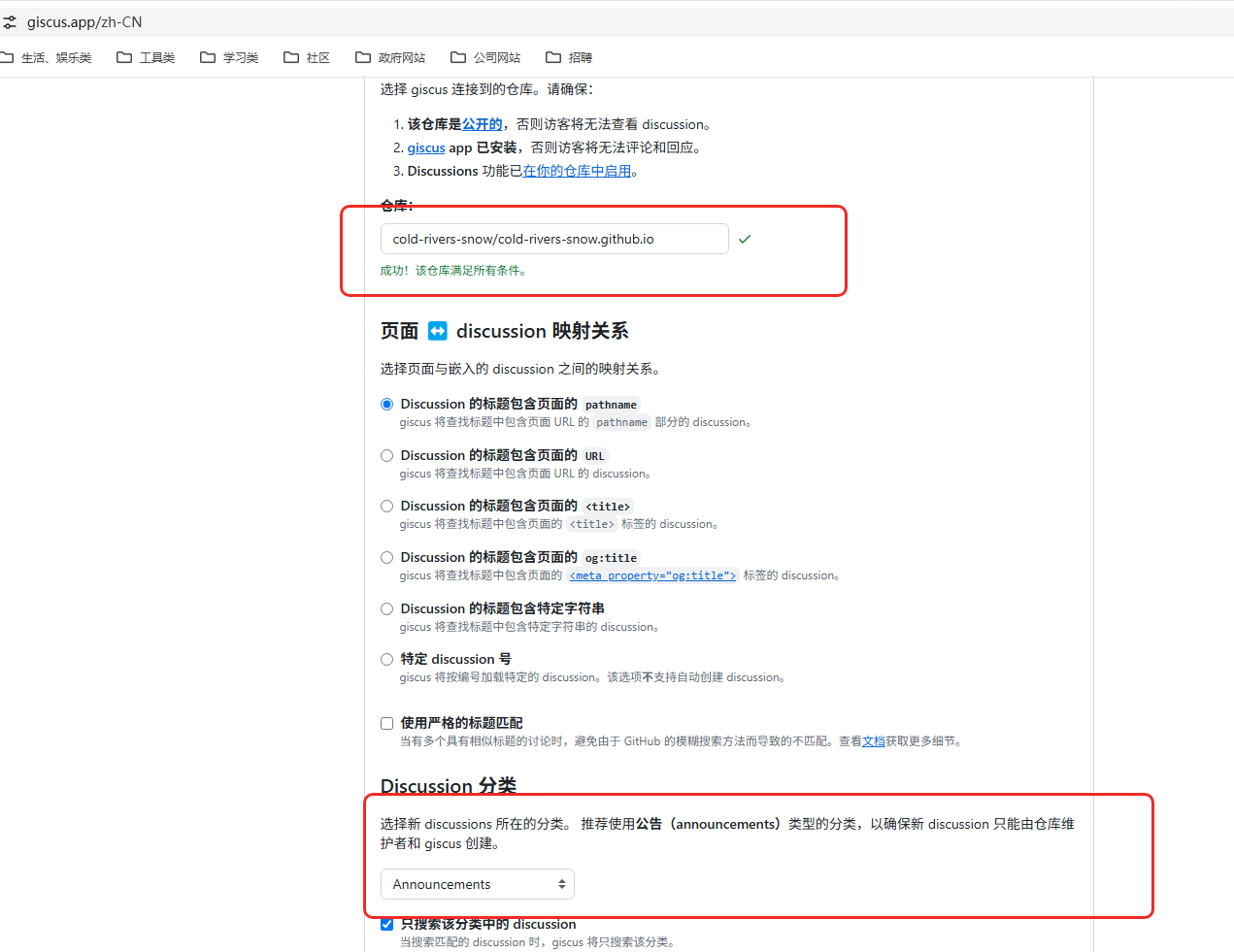
将生成的 html 记住,将 theme /stack 中的搜giscus.html 将其放入到对应的根目录下
配置 Hugo
修改配置文件
非 yaml
 1
 2
 3
 4
 5
 6
 7
 8
 9
10
11
12
13
14
| [params.giscus]
enable = true
repo = "cold-rivers-snow/cold-rivers-snow.github.io" # 替换为您的 GitHub 仓库
repoId = "R_kgDOJpljfQ" # 替换为您的仓库 ID
category = "General" # 评论分类
categoryId = "DIC_kwDOJpljfc4CoOtn" # 替换为您的分类 ID
mapping = "title" # 使用文章标题作为映射
strict = 0 # 严格模式
reactionsEnabled = 1 # 启用反应
emitMetadata = 0 # 不发送元数据
inputPosition = "top" # 评论框位置
theme = "preferred_color_scheme" # 跟随系统主题
lang = "zh-CN" # 语言设置
loading = "lazy" # 懒加载
|
yaml:
 1
 2
 3
 4
 5
 6
 7
 8
 9
10
11
12
13
14
15
16
17
| comments:
enabled: true
# giscus, disqus, utterances, waline, artalk, twikoo
system: "giscus"
giscus:
repo: "data-repo"
repoId: "data-repo-id"
category: "Announcements"
categoryId: "data-category-id"
mapping: "pathname"
strict: "0"
reactionsEnabled: "1"
emitMetadata: "0"
inputPosition: "bottom"
theme: "preferred_color_scheme"
lang: "en"
|
repoid 获取 https://api.github.com/repos/用户名/仓库名
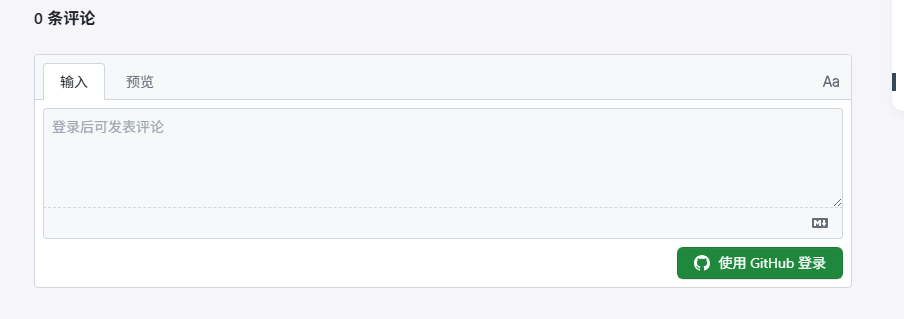
最终你会在文章底部看到这样一个界面:
pjax 修复
修改layouts/partials/comments/include.html,添加一个元素标识,方便判断文章是否开启了评论
1
2
3
4
| {{ if .Site.Params.comments.enabled }}
...
<div class="comment"></div>
{{ end }}
|
结合giscus文件,layouts/partials/comments/provider/giscus.html 添加以下代码
 1
 2
 3
 4
 5
 6
 7
 8
 9
10
11
12
13
14
15
16
17
18
19
20
21
| {{- with .Site.Params.comments.giscus -}}
<div class="js-Pjax">
<script>
(function () {
// 判断当前是否有文章评论标识
let comment = document.querySelector(".comment");
if (!comment) {
return
}
let script = document.createElement('script');
// 将对应评论的脚本内容填进去
script.setAttribute('src', 'https://giscus.app/client.js');
script.setAttribute('data-repo', '{{- .repo -}}');
// ...以此类推
script.async = true;
// 寻找合适的元素,添加脚本进去(在页脚前将评论脚本插入)
document.querySelector('.site-footer').before(script)
})(document);
</script>
<div>
{{- end -}}
|
在layouts/partials/footer/custom.html,引入以下代码
1
2
3
4
5
6
7
8
| <script>
var pjax = new Pjax({
selectors: [
...
".js-Pjax"
]
})
</script>
|
github 部署
创建仓库,名为 自己用户名.github.io
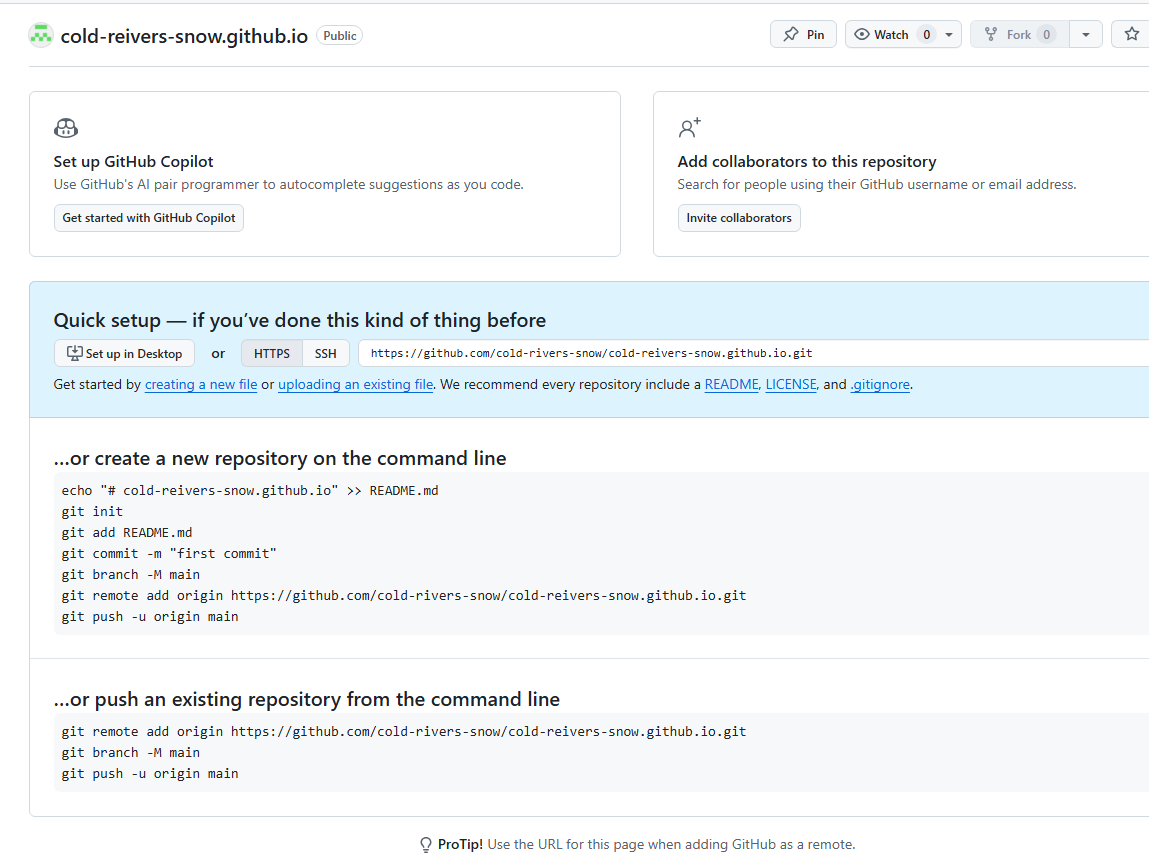
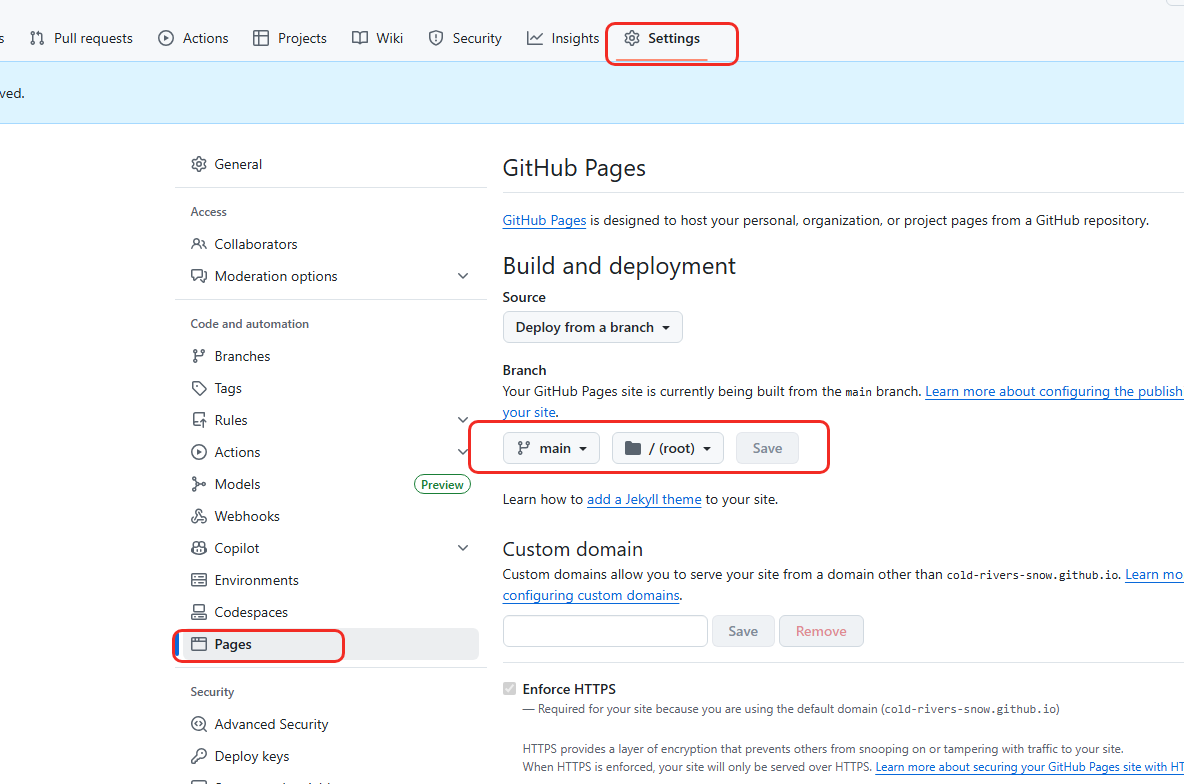
生成 token,在用户的 setting->Developer Settings->Personal access tokens,创建一个token(classic)
token选择永不过期,并勾选 repo 和 workflow 选项
为保证安全,将生成的token,保存的仓库的变量中,前往 项目的Settings -> Secrets and variables -> Actions中设置,配置环境变量
创建一个.github/workflows/xxxx.yaml`文件,将以下内容复制进去,想具体了解更多,可查看【Github Action文档】
 1
 2
 3
 4
 5
 6
 7
 8
 9
10
11
12
13
14
15
16
17
18
19
20
21
22
23
24
25
26
27
28
29
30
31
32
33
34
| name: deploy
# 代码提交到main分支时触发github action
on:
push:
branches:
- main
jobs:
deploy:
runs-on: ubuntu-latest
steps:
- name: Checkout
uses: actions/checkout@v4
with:
fetch-depth: 0
- name: Setup Hugo
uses: peaceiris/actions-hugo@v3
with:
hugo-version: "latest"
extended: true
- name: Build Web
run: hugo -D
- name: Deploy Web
uses: peaceiris/actions-gh-pages@v4
with:
PERSONAL_TOKEN: ${{ secrets.你的token变量名 }}
EXTERNAL_REPOSITORY: 你的github名/你的仓库名
PUBLISH_BRANCH: main
PUBLISH_DIR: ./public
commit_message: auto deploy
|
建.gitignore`文件,来避免提交不必要的文件
1
2
3
4
5
6
7
| # 自动生成的文件
public
resources
.hugo_build.lock
# hugo命令
hugo.exe
|
查看仓库,Action
搭建图床
picgo
picgo的下载
首先在浏览器内直接搜索picgo
GitHub下载链接
picgo的配置
插件设置搜索 bilibil 或 bilibili github 地址
点击安装,依赖,需要提前安装 nodejs
登录 b 站 f12 获取以下值

将SESSDATA复制到picgo的SESSDATA中;将bili_jct复制到picgo的csrf中

配置默认远程服务

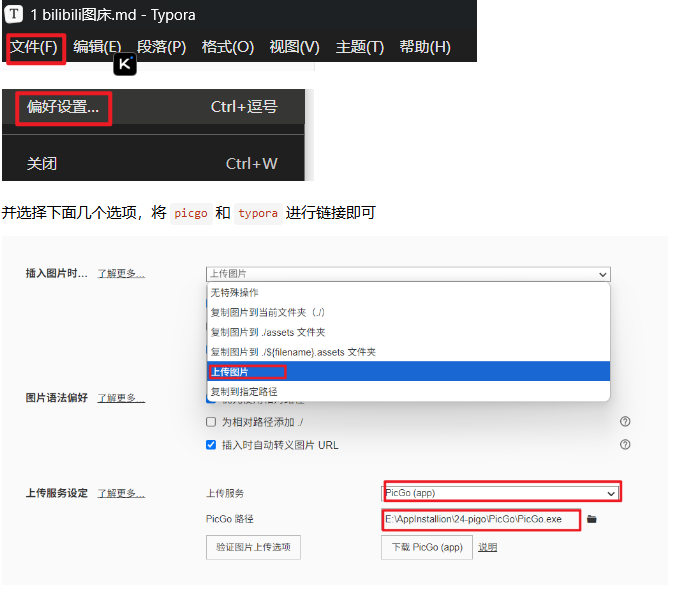
typora
文本用法
引入外部内容
学如逆水行舟,不进则退。
  1
  2
  3
  4
  5
  6
  7
  8
  9
 10
 11
 12
 13
 14
 15
 16
 17
 18
 19
 20
 21
 22
 23
 24
 25
 26
 27
 28
 29
 30
 31
 32
 33
 34
 35
 36
 37
 38
 39
 40
 41
 42
 43
 44
 45
 46
 47
 48
 49
 50
 51
 52
 53
 54
 55
 56
 57
 58
 59
 60
 61
 62
 63
 64
 65
 66
 67
 68
 69
 70
 71
 72
 73
 74
 75
 76
 77
 78
 79
 80
 81
 82
 83
 84
 85
 86
 87
 88
 89
 90
 91
 92
 93
 94
 95
 96
 97
 98
 99
100
101
102
103
104
105
106
107
108
109
110
111
112
113
114
115
116
117
118
119
120
121
122
123
124
125
126
127
128
129
130
131
132
133
134
135
136
137
138
139
140
141
142
143
144
145
146
147
148
149
150
151
152
153
154
155
156
157
158
159
160
161
162
163
164
165
166
167
168
169
170
171
172
173
174
175
176
177
178
179
180
181
182
183
184
185
186
187
188
189
190
191
192
193
194
195
196
197
198
199
200
201
202
203
204
| #include <iostream>
#include <cstddef> // 用于size_t
#include <stdexcept> // 用于异常处理
template<typename T>
struct Array {
public:
// 迭代器类型定义(模仿vector的迭代器行为)
using iterator = T*;
using const_iterator = const T*;
// 默认构造函数:初始容量为1
Array() : _data(new T[1]), _size(0), _cap(1) {}
// 带初始容量的构造函数
explicit Array(size_t cap) : _cap(cap), _size(0) {
if (cap == 0) {
throw std::invalid_argument("Capacity cannot be zero");
}
_data = new T[cap];
}
// 拷贝构造函数(深拷贝,避免浅拷贝问题)
Array(const Array& other) : _size(other._size), _cap(other._cap) {
_data = new T[_cap];
for (size_t i = 0; i < _size; ++i) {
_data[i] = other._data[i];
}
}
// 赋值运算符重载(深拷贝)
Array& operator=(const Array& other) {
if (this != &other) { // 避免自赋值
delete[] _data; // 释放原有资源
_size = other._size;
_cap = other._cap;
_data = new T[_cap];
for (size_t i = 0; i < _size; ++i) {
_data[i] = other._data[i];
}
}
return *this;
}
// 析构函数:释放动态内存
~Array() {
delete[] _data;
_data = nullptr; // 避免野指针
}
// 获取元素个数
size_t size() const { return _size; }
// 获取容量
size_t capacity() const { return _cap; }
// 判断是否为空
bool empty() const { return _size == 0; }
// 尾插元素
void push_back(const T& val) {
if (_size >= _cap) {
reserve(2 * _cap); // 容量不足时扩容为原来的2倍
}
_data[_size++] = val;
}
// 尾删元素
void pop_back() {
if (empty()) {
throw std::out_of_range("Array is empty, cannot pop back");
}
--_size; // 逻辑删除(对于基础类型足够,复杂类型需调用析构)
}
// 访问指定索引元素(带越界检查)
T& operator[](size_t index) {
if (index >= _size) {
throw std::out_of_range("Index out of range");
}
return _data[index];
}
const T& operator[](size_t index) const {
if (index >= _size) {
throw std::out_of_range("Index out of range");
}
return _data[index];
}
// 预留容量(仅扩容,不改变元素个数)
void reserve(size_t new_cap) {
if (new_cap <= _cap) return; // 新容量小于等于当前容量则不操作
T* new_data = new T[new_cap];
for (size_t i = 0; i < _size; ++i) {
new_data[i] = _data[i];
}
delete[] _data;
_data = new_data;
_cap = new_cap;
}
// 调整元素个数(可缩小或扩容,扩容时用默认值填充)
void resize(size_t new_size) {
if (new_size > _cap) {
reserve(new_size); // 容量不足则扩容
}
_size = new_size; // 直接调整大小(缩小为逻辑删除,扩容为默认值填充)
}
// 插入元素到指定位置
void insert(iterator pos, const T& val) {
if (pos < begin() || pos > end()) {
throw std::out_of_range("Insert position out of range");
}
if (_size >= _cap) {
reserve(2 * _cap); // 扩容
pos = _data + (pos - begin()); // 扩容后迭代器失效,重新计算位置
}
// 从插入位置开始后移元素
for (iterator it = end(); it > pos; --it) {
*it = *(it - 1);
}
*pos = val;
++_size;
}
// 删除指定位置元素
void erase(iterator pos) {
if (pos < begin() || pos >= end()) {
throw std::out_of_range("Erase position out of range");
}
// 从删除位置后一个元素开始前移
for (iterator it = pos; it < end() - 1; ++it) {
*it = *(it + 1);
}
--_size;
}
// 迭代器相关函数(模仿vector的迭代器接口)
iterator begin() { return _data; }
iterator end() { return _data + _size; }
const_iterator begin() const { return _data; }
const_iterator end() const { return _data + _size; }
private:
T* _data; // 存储元素的动态数组
size_t _size; // 当前元素个数(使用size_t更符合容器设计习惯)
size_t _cap; // 容量
};
// 测试函数
int main() {
try {
// 测试构造和push_back
Array<int> arr;
arr.push_back(10);
arr.push_back(20);
arr.push_back(30);
std::cout << "Size: " << arr.size() << ", Capacity: " << arr.capacity() << std::endl; // 3,4
// 测试访问元素
for (size_t i = 0; i < arr.size(); ++i) {
std::cout << arr[i] << " "; // 10 20 30
}
std::cout << std::endl;
// 测试迭代器
for (auto it = arr.begin(); it != arr.end(); ++it) {
std::cout << *it << " "; // 10 20 30
}
std::cout << std::endl;
// 测试插入
arr.insert(arr.begin() + 1, 15);
std::cout << "After insert: ";
for (int val : arr) { // 范围for循环依赖迭代器
std::cout << val << " "; // 10 15 20 30
}
std::cout << std::endl;
// 测试删除
arr.erase(arr.begin() + 2);
std::cout << "After erase: ";
for (int val : arr) {
std::cout << val << " "; // 10 15 30
}
std::cout << std::endl;
// 测试拷贝构造
Array<int> arr2 = arr;
arr2.push_back(40);
std::cout << "arr2: ";
for (int val : arr2) {
std::cout << val << " "; // 10 15 30 40
}
std::cout << std::endl;
} catch (const std::exception& e) {
std::cerr << "Error: " << e.what() << std::endl;
}
return 0;
}
|
短代码支持语雀导出得图片链接
短代码支持 github 中代码文件引用
 1
 2
 3
 4
 5
 6
 7
 8
 9
10
11
12
13
14
15
16
17
18
19
20
21
22
23
24
25
26
27
28
29
30
31
32
33
34
35
| // Copyright 2024 The Hugo Authors. All rights reserved.
//
// Licensed under the Apache License, Version 2.0 (the "License");
// you may not use this file except in compliance with the License.
// You may obtain a copy of the License at
// http://www.apache.org/licenses/LICENSE-2.0
//
// Unless required by applicable law or agreed to in writing, software
// distributed under the License is distributed on an "AS IS" BASIS,
// WITHOUT WARRANTIES OR CONDITIONS OF ANY KIND, either express or implied.
// See the License for the specific language governing permissions and
// limitations under the License.
package main
import (
"log"
"os"
"github.com/gohugoio/hugo/common/herrors"
"github.com/gohugoio/hugo/common/loggers"
"github.com/gohugoio/hugo/commands"
)
func main() {
log.SetFlags(0)
err := commands.Execute(os.Args[1:])
if err != nil {
for _, e := range herrors.Errors(err) {
loggers.Log().Errorf("%s", e)
}
os.Exit(1)
}
}
|
 1
 2
 3
 4
 5
 6
 7
 8
 9
10
11
12
13
14
15
16
17
18
19
20
21
22
23
24
25
26
27
28
29
30
31
32
33
34
35
36
37
38
39
40
41
42
43
44
45
46
47
48
49
50
51
52
53
54
55
56
57
58
59
60
61
62
63
64
65
66
67
68
69
70
71
72
73
74
75
76
77
78
79
80
81
82
83
84
85
86
87
88
89
| // -*- mode:C++; tab-width:8; c-basic-offset:2; indent-tabs-mode:nil -*-
// vim: ts=8 sw=2 sts=2 expandtab ft=cpp
/*
* Ceph - scalable distributed file system
*
* Copyright (C) 2022 New Dream Network
*
* This is free software; you can redistribute it and/or
* modify it under the terms of the GNU Lesser General Public
* License version 2.1, as published by the Free Software
* Foundation. See file COPYING.
*
*/
#include <sys/types.h>
#include <string.h>
#include <chrono>
#include "include/rados/librgw.h"
#include "include/str_list.h"
#include "common/ceph_argparse.h"
#include "common/ceph_context.h"
#include "common/dout.h"
#include "rgw_lib.h"
#include <errno.h>
#include <thread>
#include <string>
#include <mutex>
#define dout_subsys ceph_subsys_rgw
namespace rgw {
bool global_stop = false;
static std::mutex librgw_mtx;
static RGWLib rgwlib;
} // namespace rgw
extern "C" {
int librgw_create(librgw_t* rgw, int argc, char **argv)
{
using namespace rgw;
int rc = -EINVAL;
g_rgwlib = &rgwlib;
if (! g_ceph_context) {
std::lock_guard<std::mutex> lg(librgw_mtx);
if (! g_ceph_context) {
std::vector<std::string> spl_args;
// last non-0 argument will be split and consumed
if (argc > 1) {
const std::string spl_arg{argv[(--argc)]};
get_str_vec(spl_arg, " \t", spl_args);
}
auto args = argv_to_vec(argc, argv);
// append split args, if any
for (const auto& elt : spl_args) {
args.push_back(elt.c_str());
}
rc = rgwlib.init(args);
}
}
*rgw = g_ceph_context->get();
return rc;
}
void librgw_shutdown(librgw_t rgw)
{
using namespace rgw;
CephContext* cct = static_cast<CephContext*>(rgw);
rgwlib.stop();
dout(1) << "final shutdown" << dendl;
cct->put();
}
} /* extern "C" */
|
关于 github.com 和 raw.githubusercontent.com 区别的比较:
| 特性 | github.com | raw.githubusercontent.com |
|---|
| 主要目的 | 提供 Web 界面、用户界面和代码仓库管理。 | 提供 原始、未经处理的文件内容(Raw Content)。 |
| 返回内容 | HTML 页面(包含导航栏、按钮、评论等)。 | 文件的纯文本(或二进制)内容,没有 HTML 包装。 |
| Content-Type | text/html | 通常是 text/plain 或文件对应的 Mime-Type。 |
| 典型 URL 路径 | .../user/repo/blob/main/file.go | .../user/repo/main/file.go |
| 使用场景 | 人类用户通过浏览器进行代码审查、提交、Issue 跟踪等操作。 | 机器或程序(如 Hugo、脚本)需要下载、读取、或直接使用文件内容。 |
| 文件加载 | 文件内容被嵌入到网页的 HTML 结构中。 | 文件内容作为独立的数据流直接传输。 |
引入外部链接
搜索Reference
https://www.bilibili.com/video/BV1bovfeaEtQ?spm_id_from=333.788.videopod.episodes&vd_source=3cc5c63659274d24dd07e99dc80bc98d
https://letere-gzj.github.io/hugo-stack/p/hugo/custom-blog/
https://huxinme.top/posts/blog/hugo-blog/
https://the-oone.github.io/p/github-pages-hugo-%E9%83%A8%E7%BD%B2%E4%B8%AA%E4%BA%BA%E5%8D%9A%E5%AE%A2/
https://www.github-zh.com/getting-started/github-pages
https://ainfinitythecoder.cn/zh/posts/wondering/setup-a-personal-blog/
https://blog.jaxiu.cn/blog/2025-07/%E4%BB%8E%E9%9B%B6%E5%88%B0%E4%B8%80%E4%BD%BF%E7%94%A8-hugo-%E5%92%8C-github-pages-%E6%90%AD%E5%BB%BA%E4%B8%AA%E4%BA%BA%E5%8D%9A%E5%AE%A2/
https://gohugo.io/documentation/
https://letere-gzj.github.io/hugo-stack/p/hugo/custom-stack-theme/#2-%E4%BF%AE%E6%94%B9%E9%BC%A0%E6%A0%87%E6%A0%B7%E5%BC%8F
https://letere-gzj.github.io/hugo-stack/archives/
https://github.com/JanePHPDev/TurboFeLy 替代 pjax
https://www.heyjude.blog/zh-cn/posts/giscus-comments-hugo/
https://www.cnblogs.com/AxonoSensei/p/19052814